
Feedback · Features · Live chat
Turn users into
your product team.
Feedback, ideas, and live chat embedded on your site. Built for indie hackers and small teams who ship fast — live in 60 seconds.
One platform to collect, manage, and act on feedback.
Everything you need to close the loop between what your users want and what you ship.
Widgets
A feedback button, a thumbs-up/down rating, and triggered surveys (NPS, CSAT, CES) — all from a single embed. Users submit bugs, ideas, and praise with full context attached, no account required.
Stop losing feedback in email threads.
Product teams spend hours stitching signals from a dozen tools. One customer feedback management dashboard replaces the ritual.
Feedback scattered everywhere
Email, Slack, Intercom, support tickets — feedback buried in ten tools. SeggWat centralizes every signal in one calm inbox.
Silent users won't write in
83% of unhappy users never email support — but they'll click a button. A discreet widget makes feedback frictionless.
Bug reports missing context
No browser, no version, no screenshot. SeggWat captures it all automatically — so you fix issues three times faster.
Setup in 60 seconds.
Drop a single script tag onto any page. The embeddable feedback widget and everything behind it comes with it.
Add one script tag
Paste a single line of JavaScript before your closing </body>. Works with React, Vue, WordPress, or plain HTML — no build step.
Users click and talk
A discreet feedback launcher appears on every page. Users submit bugs, ideas, and praise with screenshot, URL, and version auto-attached.
Triage in the inbox
Every submission lands in your SeggWat dashboard — classified, searchable, and ready to assign, reply, or pipe into Linear.
<script src="https://seggwat.com/static/widgets/v1/seggwat-feedback.js" data-project-key="YOUR_KEY"></script>Paste this before your closing </body> tag. That's it — the feedback button appears automatically.
14-day free trialSetup in 60 seconds
Triage feedback from your iPhone.
The native SeggWat iOS app — push notifications, swipe-to-triage, and your inbox in your pocket. Free with every plan.
See SeggWat for iOS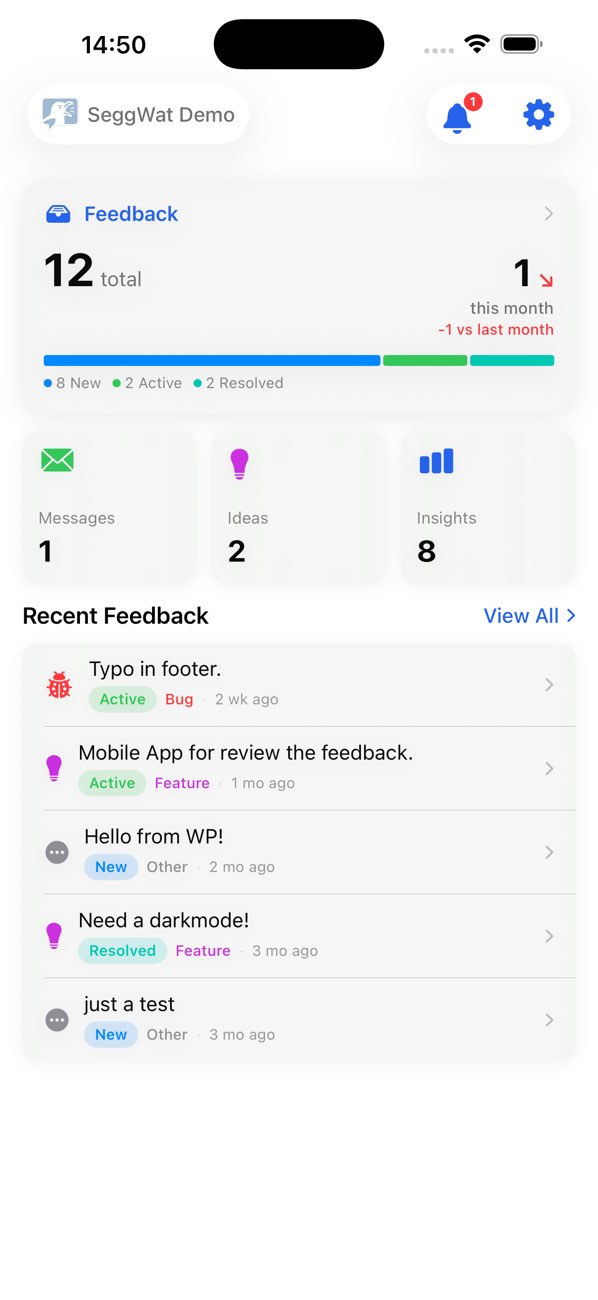
Built for teams who care.
Solo founder or product org — SeggWat helps you listen, act, and build trust with the people who pay your bills.
Have a different use case? Read the docs →Ship the next feature your users asked for
Drop a widget on your site, capture annotated bug reports, and turn user signal into a public roadmap. Priced for a side project, not a sales org.
For indie hackers →- From $6/mo — no per-seat math
- 60-second install, no SDK to vendor
- MCP server for AI triage in your IDE
One calm inbox for every user signal
Widget submissions, NPS responses, support emails, and Stripe/Polar webhooks all land in one place — so you can spend your one workday a week on the right thing.
For solo founders →- Bugs arrive with screenshot + version + path
- Stripe/Polar feedback in the same inbox
- iOS app for triage on the go
Feedback that scales with your team, not your bill
From two-person startups to 30-person product teams: one platform with roles, shared notifications, and integrations — without the per-seat math that punishes you for hiring.
For small teams →- $15/mo Pro covers up to 30 members
- Roles, audit log, shared notifications
- Slack, n8n, GitHub, Chrome, iOS
Simple, transparent pricing
Choose a plan that fits your stage. Switch or cancel anytime.
Starter
For new products collecting their first insights
- 14-day free trial
- Up to 3 projects
- Team size: 2 members
- Customizable Widgets
- Plugins & Integrations
- Build & preview surveys (draft)
- Community Discord
Pro
For growing teams with advanced needs
- Everything in Starter
- Up to 30 projects
- Team size: 30 members
- Publish NPS & in-product surveys
- Live chat
- White-label email sender
- Custom board domain
- Priority Support
Weighing your options? Compare feedback tools, or see how a public roadmap turns feedback into your build plan.
Frequently asked.
Everything you need to know about collecting user feedback with SeggWat.
Add one line of JavaScript to your site. Copy the script tag from your dashboard, paste it before the closing </body> tag, and the feedback button appears automatically. No npm packages, no build steps—works with any website including WordPress, React, Vue, and static HTML.
A feedback widget is an embeddable button that lets users submit feedback directly from your website. Unlike email or contact forms, widgets capture context like page URLs and browser info automatically. Users are 10x more likely to click a button than compose an email.
Yes, SeggWat works with any website: WordPress, Ghost, React, Next.js, Vue, Nuxt, Angular, static sites, and more. If it runs in a browser, SeggWat works with it.
Yes! SeggWat includes built-in screenshot annotation. Users can capture their screen and draw arrows, rectangles, and text to highlight issues. This helps you reproduce bugs 3x faster without back-and-forth communication.
Yes, SeggWat offers a 14-day free trial with up to 30 feedback responses. Upgrade anytime when you need more capacity or additional features.
No coding required. Just paste a single script tag into your HTML. You can customize the button color, position, and language through data attributes—no JavaScript knowledge needed.
Customize color, position (bottom-right, right-side, icon-only), language (English, German, Swedish, French), and more using simple data attributes on the script tag. You can also hide the 'Powered by' branding for white-label implementations.
Yes, SeggWat supports teams with Owner, Admin, and Member roles. Collaborate on feedback, assign items to team members, and track resolution status together in one shared dashboard.
Yes, SeggWat is built and hosted entirely in the EU (Germany). We don't use tracking cookies, we don't sell data, and GDPR compliance is enabled by default. Full data export and deletion capabilities are available.
Yes! SeggWat provides a REST API, MCP server for AI assistants like Claude, and webhook support for workflow automation with tools like n8n and Zapier. Export your data or trigger actions when new feedback arrives.
Still have questions? We read every message.